How ShopTrak Dispatch Works
The Dispatch Board Layer for High-Volume Dealership Service Departments
ShopTrak Dispatch is a dedicated dispatch board add-on built for the daily reality of running a high-volume service department. Operating seamlessly alongside CDK, Reynolds & Reynolds, Tekion, Dealertrack, or Tekmetric, it optimizes how you import jobs, assign repair orders, balance technician workload, manage shop capacity, and handle carryover work — without replacing your DMS.
01 — Import Assistant (No IT Integration Required)
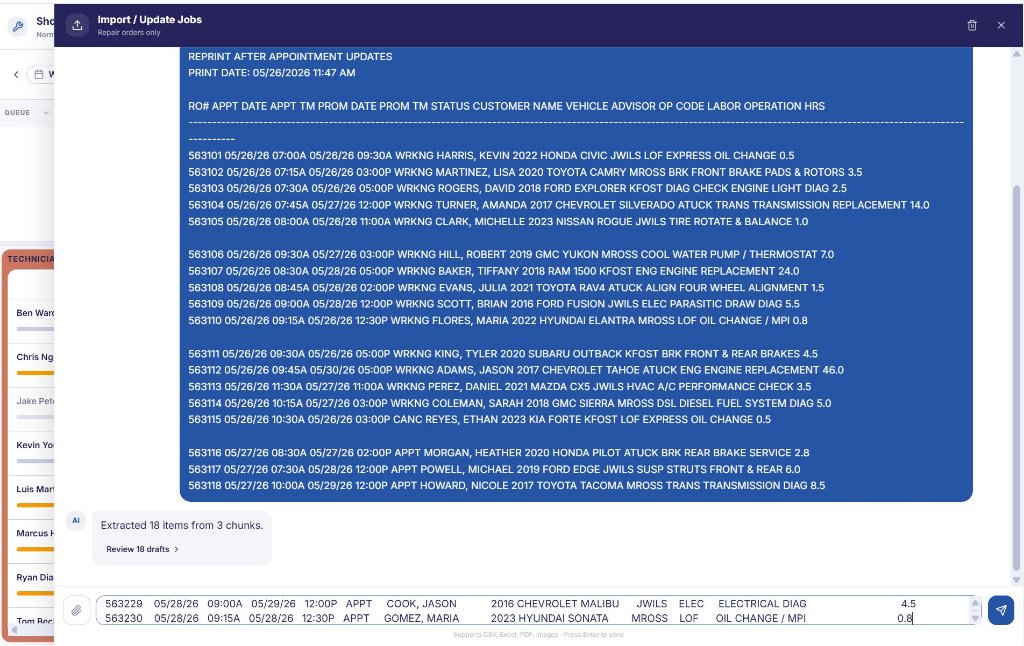
Pull open ROs straight from your DMS screen into your dispatch queue
ShopTrak doesn't replace your DMS — it sits securely on top of it. Simply highlight and copy your open RO report text directly from your DMS terminal screen and paste it into the Import Assistant. ShopTrak automatically parses and organizes your data in seconds.
02 — Dispatch Board Planning
See the entire shop day on a single, real-time technician timeline
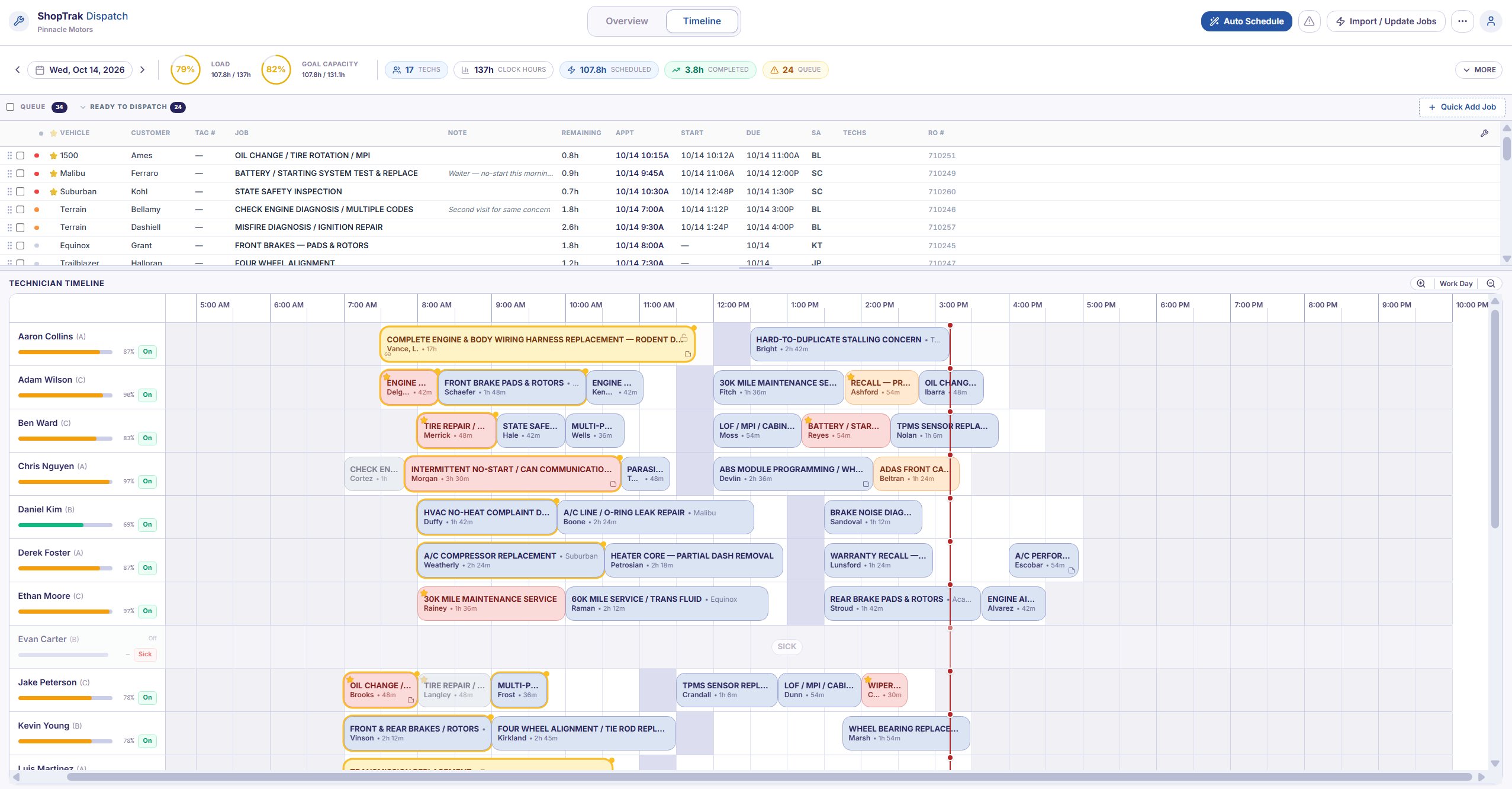
Every active technician is mapped onto a single, dynamic timeline. Dispatchers simply drag repair orders from the incoming queue and drop them directly onto a technician's row.
Intelligent Snapping
Jobs automatically snap to open slots while respecting individual shift hours, scheduled lunches, and existing workloads.
Instant Gap Identification
Open time slots and schedule holes stand out instantly, allowing dispatchers to fill them before the day falls behind.
Proactive Scheduling
Build tomorrow's dispatch strategy today. Move work between days effortlessly as appointments shift.
03 — Dynamic Technician Scheduling
The timeline automatically adapts to each technician's pace and skill level
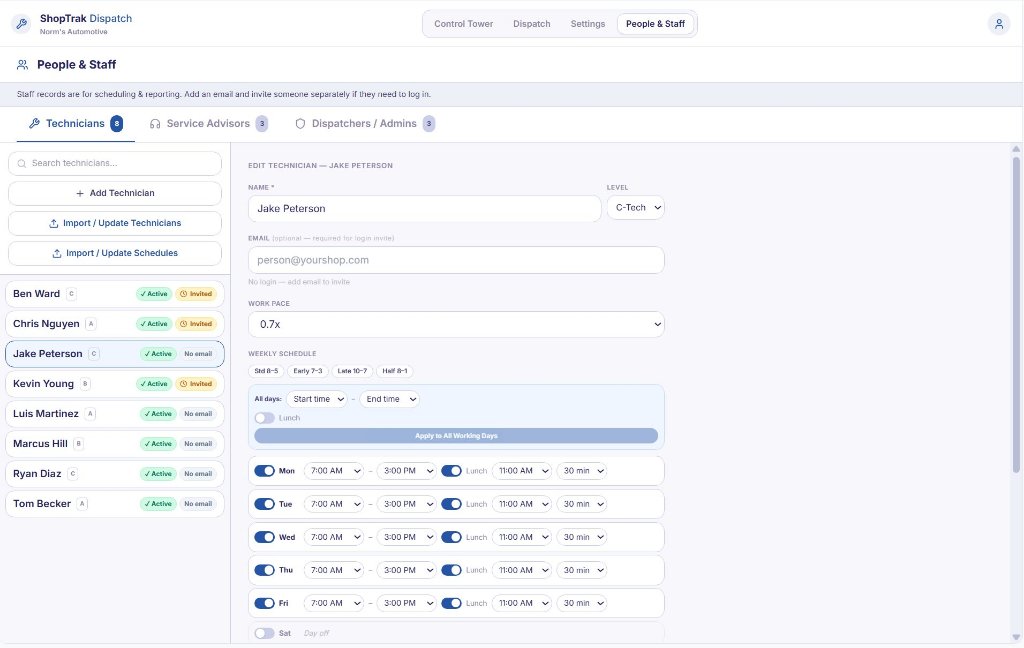
Different technicians consume time differently. ShopTrak models each technician's tier (A-Tech / B-Tech / C-Tech) and individual pace multiplier so the capacity you see on the screen matches the actual productivity on your shop floor.
The ShopTrak Math
A 2.0-hour flag-rate job assigned to an efficient A-Tech shouldn't consume the same physical block of your day as it would on a C-Tech's timeline. ShopTrak automatically scales the job block based on their historical pace multiplier to protect your shop's velocity.
04 — Multi-Segment Job Scheduling
Split complex repair orders across specialized technicians and multiple days
Real dealership work doesn't always fit a single technician or a single block of time. ShopTrak handles complex routing natively: split any multi-line RO into distinct segments and schedule each piece independently.
05 — The Live Operational Metrics Playbook
High-value shop metrics surfaced across the top of every view
A dealership service department is a perishable-inventory business. A technician's 8-hour shift is gone forever if those hours aren't sold — you can't stock them on a parts shelf for tomorrow. ShopTrak displays key operational indicators across the top of the screen so dispatchers, foremen, and fixed ops managers can monitor shop proficiency in real time.

| Metric | How It's Calculated | What It Tells You |
|---|---|---|
| Load | Scheduled Hours ÷ Clock Hours | Shop Volume 100% means every physical hour on the clock has work scheduled against it. Over 100% means you are overbooked. |
| Goal Capacity | Scheduled Hours ÷ Effective Capacity | True Productivity Adjusts raw clock hours for each tech's pace and skill. Indicates how full the shop is against its realistic output. |
| Techs | Count of Active Personnel | Live Headcount The exact number of technicians on the floor today, automatically subtracting sick days, training, or vacation. |
| Clock Hours | Sum of Active Tech Shift Hours | Paid Labor Inventory The total raw labor hours available today (shifts minus lunches). This is the baseline payroll expense you need to clear. |
| Scheduled | Sum of Billable Hours Assigned | Committed Revenue The total flat-rate billable hours currently committed to the timeline. |
| Completed | Sum of Signed-Off Billable Hours | Production Conversion Flat-rate hours finalized by techs. Watching this climb tells you how fast you are turning a plan into gross profit. |
| Queue | Count of Unscheduled ROs | Backlog Warning Repair orders waiting to be placed. A spiking queue means service drive intake is outpacing your shop floor capacity. |
| Lost Time | Unscheduled Clock Hours | Unbilled Payroll Clock hours you are actively paying for that have zero billable work scheduled against them. The target is always zero. |
| Avg Pace | Weighted Average Tech Multiplier | Shop Proficiency Above 1.0x means your team is beating the flat-rate guide and generating more billable hours than clock hours. |
06 — Exceptions & Carry Forward
Eliminate the black holes where labor revenue quietly dies
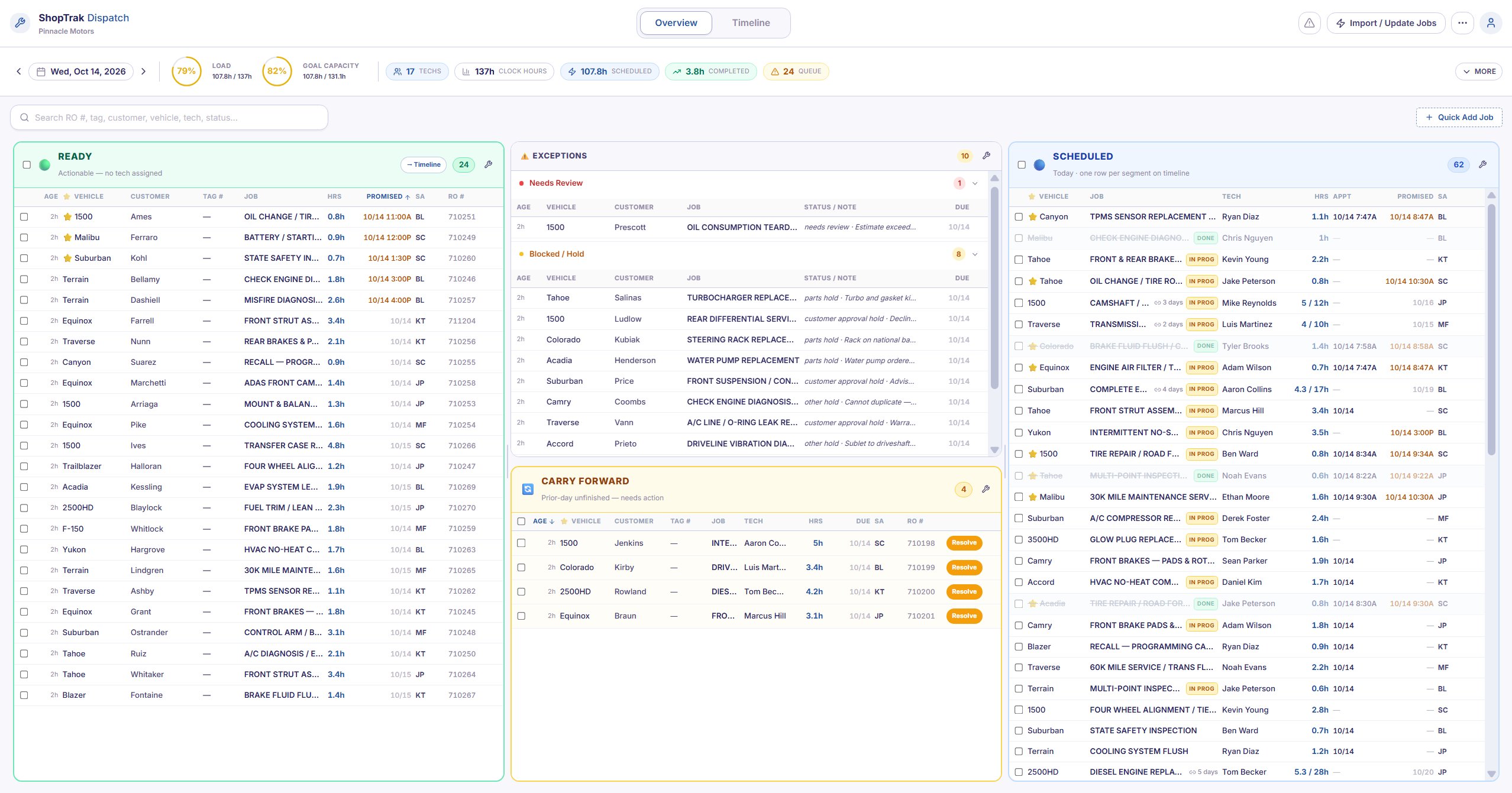
Unusual jobs — parts holds, customer delays, sublet issues, and unfinished work — frequently derail shop efficiency. ShopTrak isolates these into two dedicated lanes to force resolution before deadlines are missed.
The Exceptions Lane
Designed for jobs that cannot be actively dispatched due to external constraints. By pulling them out of the main queue, dispatchers can focus entirely on actionable work.
Dedicated Parking Statuses
Instantly categorize jobs by constraint: Blocked / On Hold (waiting on parts, customer approval, or warranty) or Snoozed (deferred to a specific future date).
Inline Context
Every exception displays its root cause inline so the team knows exactly why an RO is parked without asking around.
The Carry Forward Lane
Unfinished work at closing time shouldn't silently linger on yesterday's dead calendar. ShopTrak automatically lifts uncompleted jobs into the Carry Forward lane the next morning.
Age Tracking
Displays exact duration tags (e.g., "Waiting 4d") so aging internal or customer jobs are impossible to miss.
Context Preservation
Retains the original technician assignment and accurately tracks remaining flat-rate hours left to complete.
One-Click Resolution
Re-schedule remaining hours to the original tech, reassign it to an open bay, or close it out instantly.
07 — Overview & Role Views
Complete operational transparency from the service drive to the wash bay
The Overview page gives shop foremen and fixed ops managers a Kanban-style view of every job, regardless of assignment. Spot bottlenecks, blocked ROs, and unfinished work from prior days before they become a problem for the service drive — then ShopTrak adapts to your org structure with dedicated, role-specific views below.
Role-specific views
Dedicated views to keep your entire staff aligned
ShopTrak adapts to your organizational structure, delivering dedicated, role-specific views to keep dispatchers, foremen, advisors, and technicians aligned.
Dispatchers & Shop Foremen
Complete access to the high-volume dispatch timeline, Overview Kanban boards, staff pace modeling, and multi-day scheduling tools.
Service Advisors
View real-time status updates across the entire shop floor. Flag waiter or ASAP vehicles and view accurate completion times without ever leaving the service drive to chase dispatch.
Technicians
A mobile-first personal schedule showing only their assigned jobs in order, targeted due times, and clear clock hours. Features one-tap Start Job and Complete Job actions to minimize dispatch radio chatter.
Pilot Program
Seeking Service Departments for Pilot Program Partnership
We are actively inviting a select group of high-volume dealership service departments to deploy ShopTrak Dispatch and directly collaborate with our product engineering team.
We are looking to partner with active:
Want a direct look at the board? Schedule a live, 15-minute operational walkthrough with our team: dispatch@shoptrak.com